





Why Front-Seat Wheelchair Conversions Are Safer
Discover how front-seat wheelchair conversions can support safer travel through secure positioning, tested engineering, and easier vehicle access.

For wheelchair users with a pickup truck converted for accessibility, getting into their vehicle can look very different than that of a conventional van. A hydraulic lift can bring the wheelchair and its user directly into the cabin, removing the need to climb into the vehicle or transfer out of the chair before entry.
ATC Mobility uses an integrated hydraulic lift system in its converted Chevrolet Silverado and GMC Sierra trucks. Although the system simplifies entry and exit, following the proper sequence remains important every time you travel. Below, our guide will show you how to use a truck wheelchair lift step-by-step.
A smooth entry starts before you press a button. Take a moment to look around the truck and make sure the accessible side has enough open space for the door and lift to operate without hitting another vehicle, wall, curb, or other obstruction.
Whenever possible, park on a firm, level surface. Engage the parking brake and follow the operating instructions for your specific vehicle before activating the conversion equipment.
ATC Mobility recommends using the remote start to turn on your truck before operating the gull-wing door and hydraulic lift system.
Running the engine lets the alternator continuously supply the high voltage needed for heavy-duty components like the hydraulic pump, avoiding unnecessary battery drain.
Starting the vehicle beforehand also lets the engine and electrical system warm up, which helps the hydraulic fluid and actuators operate smoothly in cold weather. [Alarm Tip: If you use the remote start, remember to hit the unlock button afterward to prevent the factory vehicle alarm from triggering when you open the door.]
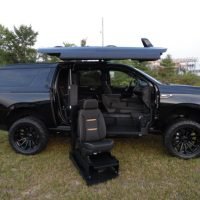
The first step to activate the conversion opening the truck’s accessible gull-wing door. With an ATC Mobility truck wheelchair conversion, the converted side doors have been connected and reinforced, and open out and up (as a gull’s wing does) to provide access to the lift system and wheelchair entry area. This also means that if the vehicle is inside a structure, like a parking garage, you must ensure there is enough clearance for the doors to safely open.
Wait until the door finishes opening before continuing. Keep your hands, wheelchair components, clothing, and other equipment away from hinges and moving parts while the system operates.
Once the door is opened completely, you can now deploy the hydraulic lift. The platform moves out and down from the truck until the lift pan reaches the ground and creates an accessible boarding surface.
ATC Mobility’s systems can carry the wheelchair user into the truck without requiring a ramp. Its hydraulic lift has a capacity of 750 pounds, so the combined weight of the user, wheelchair, and attached equipment must remain within the system’s limits.
Allow the platform to stop completely before moving your wheelchair onto it. A fully deployed lift gives you a stable surface for positioning the chair and preparing for the lifting cycle.
Look at the platform before boarding to confirm there is no dirt, ice, debris, or other obstruction you must address before continuing.

With ATC Mobility conversions, users back their wheelchair onto the lift pan so their seated position inside the vehicle is facing forward. Approach deliberately and line up the wheelchair straight before moving onto the platform.
Position the wheelchair in the center and confirm the chair’s wheels and all other equipment is within the area. Careful positioning can make the transition into the truck smoother once the lift begins moving.
For electronic wheelchair users, move slowly and make small movements as you back into position. Controlled movement gives you more time to adjust your alignment.
Manual wheelchair users should move at a comfortable pace and use assistance when necessary.
Once you reach the correct position, engage the lift pan’s wheelchair locking mechanism, which is installed post-conversion and consulted with your mobility dealer as most suitable for your vehicle and chair.
Activate the chair’s brakes or use the appropriate setting and confirm that the wheelchair is secure before activating the lift. Remain centered and limit movement while the hydraulic system raises the platform.
Take a moment to check your position before beginning the lift cycle. Attached bags, footrests, joystick controls, and other equipment should remain clear of edges and moving components.
Once you securely position yourself and the wheelchair, activate the hydraulic system. ATC Mobility’s lift takes approximately 15 seconds to raise the pan up and into a converted truck or SUV.
Remain still while the platform moves. Wait for the lift to stop and align with the interior before preparing for the next part of the process.
Pay attention to your headrest, armrests, joystick, footrests, and any equipment attached to the wheelchair as you enter. Wheelchair dimensions and accessories can affect clearance even when the chair itself fits the lift comfortably.
Prior to purchase, ATC Mobility requires the customer to submit a measuring guide – there’s one for power and one for manual wheelchairs – to help determine whether a chair and its user can safely and comfortably fit a particular conversion properly.
Once the lift reaches the truck’s interior, move into the designated position for driving or riding. ATC Mobility offers both driver-side and passenger-side conversions, so the final position depends on your vehicle configuration.
Drivers must align their wheelchair with the operating setup and any mobility equipment for their needs. Passengers must secure themselves into the appropriate riding position for their vehicle.

Entering the cabin is only part of preparing for the road. Follow the instructions for your wheelchair docking or securement system and use the vehicle’s occupant restraint system.
Check every connection before traveling. If any component appears loose, damaged, or different from its normal position, address the issue before putting the vehicle in motion.
When you arrive, park in a suitable location and secure the truck before operating the accessibility equipment. Check the area outside the door to make sure the lift will have enough room to lower completely.
Open the gull-wing door, move into the correct lift position, and secure the wheelchair to the platform. Lower the lift to the ground, wait for it to stop, and exit carefully.
Now that you understand how to use a truck wheelchair lift step-by-step, all that’s left to do is practice. New users may benefit from working through the process in a spacious, quiet setting before using the lift in crowded parking areas or unfamiliar locations.
Pay attention to how the equipment normally sounds and moves. Changes such as unusual noises, uneven movement, or controls that respond differently can signal the need for professional inspection.
Do not continue operating the equipment if the lift, door, or locking system appears damaged or fails to work as expected. Forcing a component can create additional problems.
Keep up with recommended service and maintenance as well. ATC Mobility services its converted vehicles, giving owners a resource when their accessibility equipment needs professional attention.
Using a truck wheelchair lift becomes easier when you follow the same safe sequence each time. Check your surroundings, allow the equipment to complete each movement, position your wheelchair carefully, and confirm that you are secure before traveling.
Are you ready to explore what an accessible truck could make possible in your daily life? Contact ATC Mobility to discuss your wheelchair measurements, vehicle options, and the conversion setup that fits your needs.


